Your WhatsApp Groups Are a Knowledge Graveyard
How I "Talk" to My WhatsApp Messages — And Why Every Business Owner Should
Siosi Samuels · March 12, 2026

TL;DR: Your best business conversations are happening in WhatsApp. And they're dying there. Here's a 3-step workflow — using WhatsApp MCP, Google NotebookLM, and Notion — that lets you "talk" to your group chat history. But the real insight isn't the tools. It's why these three tools work together at all.
The Conversation That Sparked This
I was recording a podcast episode recently — my show, How Our Tools Shape Us — with a founder who runs experience-based businesses. Escape rooms. VR worlds. The kind of person who lights up when they talk about bringing joy to people.
But when I asked how his team communicates internally, the answer was immediate: WhatsApp.
And when I asked whether he could find a specific decision his team made three months ago — about a supplier, about a pricing change, about a customer complaint that led to a process improvement — there was a pause. Then a laugh. Then:
"No chance."
He's not alone. I hear this from nearly every small business owner I talk to. The most valuable conversations in their business — decisions, feedback, ideas, negotiations — are happening inside WhatsApp groups. And they're vanishing into the scroll.
WhatsApp groups are where knowledge goes to die.
Why This Matters More Than You Think
This isn't just a "search" problem. It's a knowledge architecture problem.
Every time a team member shares a supplier quote in a WhatsApp group, that's institutional knowledge. Every time a customer complaint gets resolved through a group discussion, that's a process decision. Every time someone drops a link to a tool, a resource, or a contact — that's intellectual capital.
And it's all trapped in a format designed for speed, not retrieval.
WhatsApp is optimised for real-time conversation. It's brilliant at that. But it has no memory. No structure. No way to surface what mattered six weeks ago. The further back you scroll, the more you feel like you're diving into a shipwreck — you know the treasure is down there somewhere, but the currents keep pulling you off course.
In Pacific navigation, there's a concept of reading the ocean — not mapping it in advance, but learning to sense what's beneath the surface by observing the patterns on top. What I'm about to show you is the digital equivalent: making the knowledge in your WhatsApp groups navigable, not just searchable.
The Workflow: 3 Steps to "Talk" to Your WhatsApp Messages
Here's the exact workflow I use. It takes about 20 minutes to set up, and once it's running, you can literally ask questions about conversations that happened months ago.
Step 1: Capture — WhatsApp MCP
WhatsApp MCP (Model Context Protocol) is a connector that extracts your WhatsApp group messages and makes them available to external AI tools. Think of it as opening a window in a sealed room — suddenly, the data that was locked inside WhatsApp can breathe.
What it does:
- Extracts messages from specific WhatsApp groups
- Outputs them in a structured format (timestamped, attributed, clean)
- Bridges WhatsApp's closed ecosystem to the broader AI tool landscape
The key insight: WhatsApp MCP doesn't change WhatsApp. It doesn't add features or break the UX. It simply creates a bridge — a way to move the raw signal out of a system designed for speed and into systems designed for depth.
Step 2: Crystallize — Google NotebookLM
Once you have your messages extracted, you upload them into Google NotebookLM as a "source."
NotebookLM does something remarkable: it turns your unstructured messages into a queryable knowledge base. You can ask it questions in natural language, and it responds with answers drawn directly from your actual conversations — with citations.
What this unlocks:
- "What did we decide about the pricing for the new room?" → NotebookLM pulls the exact conversation thread from 3 months ago
- "What feedback have customers given about wait times?" → It synthesises across dozens of scattered messages
- "When did we first discuss switching suppliers?" → Timestamped, sourced, no scrolling
This is the crystallization layer. Raw messages → structured, queryable knowledge. In Conscious Stack Design™, we call this the Capture → Crystallize arc — moving signal from its raw state into a form that compounds over time.
Step 3: Navigate — Notion (or Your Anchor Tool)
The final step is where the knowledge becomes operational. Once NotebookLM has surfaced the insights, you move the distilled outcomes into your anchor system — for me, that's Notion.
This is where decisions become records. Where patterns become SOPs. Where a supplier conversation from February becomes a procurement protocol in March.
Examples:
- A recurring customer complaint → a new FAQ page or process checklist in Notion
- A team decision buried in chat → a documented decision log
- A link someone shared 4 months ago → properly tagged in your knowledge base
The key isn't the tool. It's the flow: Capture → Crystallize → Navigate. From raw signal, to structured knowledge, to operational action.
Why These Three Tools? The Stack Behind the Workflow
Here's where it gets interesting. This workflow didn't happen by accident. It emerged naturally from a consciously designed stack.
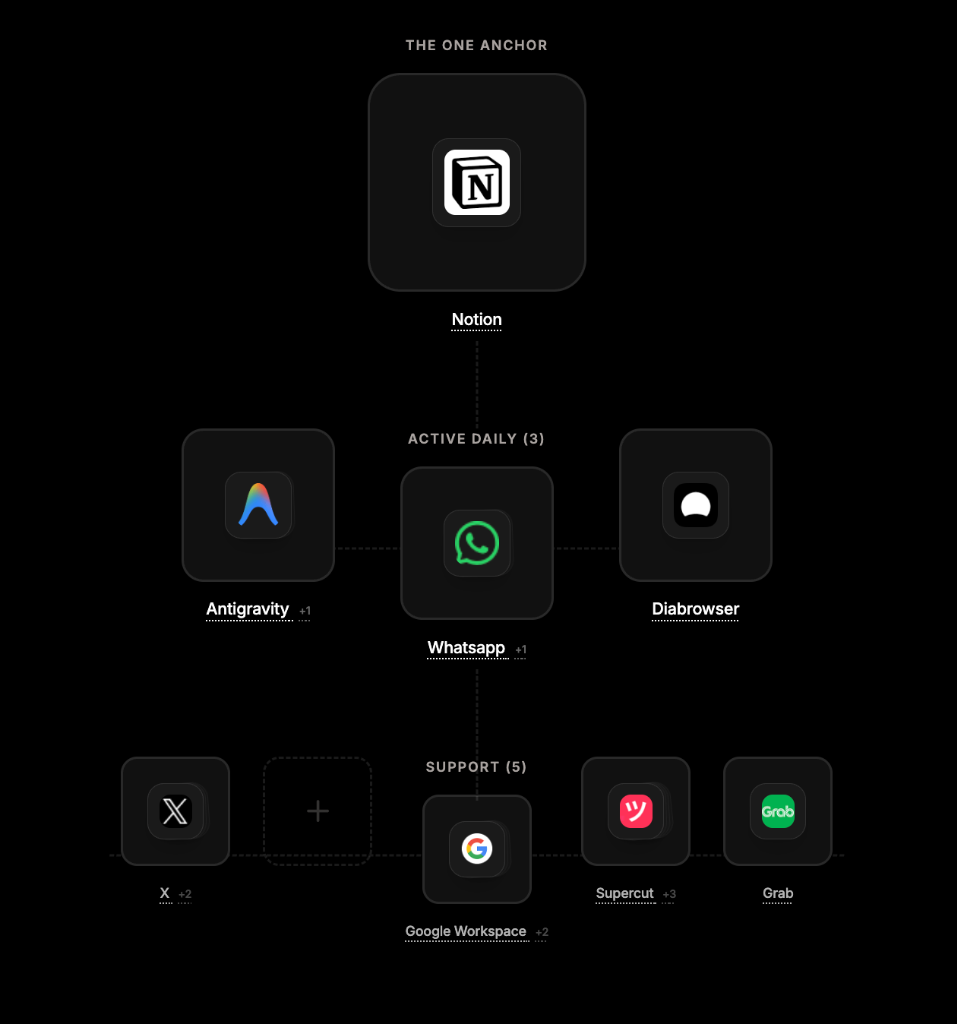
In Conscious Stack Design™, your tools are arranged in a 1:3:5 hierarchy — 1 Anchor, 3 Active Daily, 5 Supporting. When I mapped my own stack:
- Notion is my Anchor (1) — everything flows to and from it
- WhatsApp is Active Daily (3) — where the raw signal lives
- Google Workspace sits in Support (5) — and NotebookLM is inside that ecosystem (the
+2you see next to Google Workspace represents NotebookLM and Google Docs)
The workflow I'm describing — WhatsApp → NotebookLM → Notion — is literally a vertical line through my own stack. Active layer → Support layer → Anchor. It's not a hack. It's not a clever integration. It's what happens when your stack is aligned.
Most "how I use X + Y + Z" content feels like random tool-chaining. Someone discovered three tools, duct-taped them together, and wrote a tutorial. That's fine. But it's fragile. When one tool changes or a better option appears, the whole thing breaks.
A consciously designed stack produces emergent workflows — integrations that appear naturally at the intersections because the tools were chosen for structural fit, not feature checklists. You don't need to force them. They want to connect, because they're already in relationship with each other.
This is a concept I think about through the lens of vā — the Polynesian concept of sacred relational space. Tools, like people, exist in relationship. The quality of that relationship determines what emerges from it. Choose tools with vā in mind, and the workflows take care of themselves.
Going Deeper: When Your AI Navigator Lives Inside the Stack
The workflow above takes 20 minutes to set up. Anyone can do it. You don't need anything beyond WhatsApp, a browser, and a free Google account.
But because Google Antigravity (my AI Navigator) also sits in my Active Daily layer, it can automate and deepen the bridges between all three:
- It can pull WhatsApp threads via MCP and summarize them without me opening NotebookLM
- It can push structured insights directly into Notion pages
- It can flag when a conversation contains a decision that should be crystallized — before I even think to ask
This is what happens when your AI isn't just a chatbot in a browser tab. It's a member of your stack — aware of the other tools, aware of your workflow patterns, aware of what matters.
You don't need Antigravity to do what I described in the three steps above. But this is the difference between a manual workflow and a living stack — one where the tools have enough context about each other (and about you) to start surfacing patterns on their own.
In CSD terms: the 3-step workflow is Level 1 — intentional tool integration. An AI navigator living inside the stack is Level 2 — emergent intelligence from conscious architecture.
The Lesson: Your Tools Already Know More Than You Think
If you're a business owner — especially in hospitality, experiences, services, or any team-based operation — you likely have months or years of accumulated knowledge inside your WhatsApp groups.
Decisions. Feedback. Pricing conversations. Supplier negotiations. Staff ideas. Customer insights. All of it sitting in a format that makes it feel ephemeral, even though it's anything but.
The knowledge isn't gone. It's just not navigable.
And the fix isn't "more tools." It isn't another SaaS subscription or a productivity app. The fix is understanding how your existing tools relate to each other — and building the bridges that let knowledge flow between them.
That's what Conscious Stack Design™ is for. Not adding tools. Aligning them. Not more features. More coherence.
When the stack is aligned, the workflows emerge. The knowledge surfaces. The conversations you had three months ago start working for you today.
The Deeper Question
This post showed you a workflow. Three tools, three steps, twenty minutes.
But the real question isn't "How do I set this up?"
It's: "What other workflows are hiding inside my stack that I can't see — because the tools aren't aligned?"
That's the question a Stack Audit might answer. Not selling you new tools. Not optimising your click-through rate. Just mapping what you already have, finding the misalignments, and showing you where the knowledge wants to flow.
The ocean was always full of signal. The navigator's skill was learning to read it.
If you want to see more experiments like this one as they happen — raw, before they become blog posts — join the Lab. If you want me to review your own tools+stack, book a session.
This post draws on the principles of Conscious Stack Design™ and Pacific Metaphysics. For more on knowledge custody, see OMAPP.